
Paper activities for pairs
Two classroom games you can prepare with grid paper
A small grid gives a pair of learners a shared place to point, describe, and check. Try a 4×4 coordinate treasure hunt or a 6×6 pattern-copying round using the printable sheets below. Each download includes a blank finder sheet and a separate teacher answer.
Allow 5–10 minutes per activity as a planning budget, including the demonstration and role swap. These are original sample activities; that timing and their suitability for your group have not been tested in a classroom.
Open the graph paper generatorPrepare the paper and explain the coordinates
For each pair, prepare two blank finder sheets, one caller/answer sheet, and two pencils. Keep the answer out of the finder's view. Choose the PDF that matches the paper in your printer; both A4 and US Letter versions use a portrait page with 10 mm squares. Print only page 1 twice if you want a fresh sheet for the role swap, then print page 2 once for the caller.
In both activities, a coordinate names a cell. Columns run left to right, starting with A. Rows run top to bottom, starting with 1. B1 means the second cell from the left in the top row. A mark belongs inside a square, rather than on a line intersection. Demonstrate B1 on a spare sheet before starting.
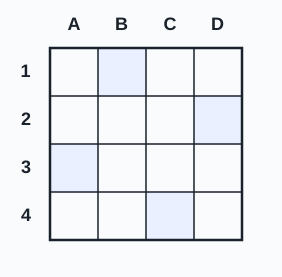
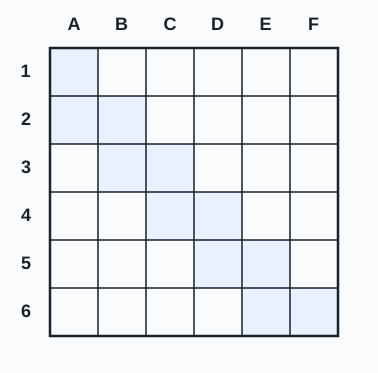
The outlined rectangle is the whole playing area. The treasure sheet has four columns, A–D, and four rows, 1–4. The pattern sheet has six columns, A–F, and six rows, 1–6. The printed labels establish the starting point, so no squares outside the outline enter the activity.
Activity 1: find four treasures on a 4×4 grid
The caller gives one coordinate at a time. The finder places a small X in the named cell and repeats the coordinate aloud. This round has four clues and no hidden movement rule: each clue names a new cell directly.
- The caller holds the answer sheet. The finder starts with a blank 4×4 sheet.
- Call B1. Wait until the finder has marked and repeated it before giving the next clue.
- Continue with D2, A3, and C4, in that order. If a coordinate is unclear, the finder can ask for it again.
- Reveal the answer. Compare all four marks, then count one point for each correctly marked cell. The maximum is four; extra marks count as incorrect marks and can be erased during the review.
- Swap caller and finder. Use a fresh blank sheet and the same four clues for a second round.
Activity 2: describe and copy a staircase on a 6×6 grid
The caller sees the shaded answer; the finder sees only the blank grid. The caller describes one row at a time, saying both the row number and its shaded columns. The finder shades whole cells with a pencil. Leave all unnamed cells empty.
- Give the caller page 2 and the finder a blank page 1. Agree to work from the top row down.
- Read the six row instructions below. Pause after each row so the finder can repeat the instruction and shade the cells.
- After row 6, reveal the answer. Check each row together. The finished shape contains eleven shaded cells.
- Swap roles with a fresh blank sheet. Repeat the sample, or let the new caller describe a different pattern drawn on a separate 6×6 sheet and retain it as the answer.
| Row | Say |
|---|---|
| 1 | “Row 1: shade A.” |
| 2 | “Row 2: shade A and B.” |
| 3 | “Row 3: shade B and C.” |
| 4 | “Row 4: shade C and D.” |
| 5 | “Row 5: shade D and E.” |
| 6 | “Row 6: shade E and F.” |
Make more sheets with the graph paper generator
The downloads above already include an outlined activity area, coordinate labels, and the answer. The GridKite graph paper generator produces full-page blank grids, which you can mark by hand for another round.
- Choose 10 mm spacing, A4 or US Letter, and Portrait. Choose Graphite for line color.
- Under “Customize lines & margins,” set margins to 12.7 mm and line width to 0.5 pt. Leave “Emphasize every 5th line” off.
- Download the PDF. Starting at its top-left complete square, outline a block four squares wide and four high, or six wide and six high.
- Write A–D or A–F above the columns and 1–4 or 1–6 beside the rows, from top to bottom. Use only this block. Make a separate answer sheet before handing out the blanks.
For a group that needs larger cells, increase the spacing and keep the same cell labels and rules. Preview the result before printing. A coordinate still names a cell even when its physical size changes.
Keep the printed grid at its intended size
Select matching A4 or US Letter paper in the print dialog, then choose Actual size or 100%. Turn off “Fit,” “Shrink,” or other page scaling. The sample PDFs contain vector grids with 10 mm intervals; four adjacent spaces span 40 mm in the file. A 4×4 outline is 40 × 40 mm, and a 6×6 outline is 60 × 60 mm.
Measure four spaces on a printed sheet with a ruler before making the class copies. Printer settings can change the physical result. PDF dimensions and rendering have been checked; a physical print from your printer still needs this measurement. See the graph paper printing guide for the difference between PDF geometry and paper scale.
About these examples
The treasure coordinates, staircase pattern, caller scripts, and diagrams are original GridKite examples. The sample grids use the same PDF geometry as the site's graph paper tool. These activities are suggestions for preparing paper materials, with no claim of measured learning gains or a particular age-level fit. Choose the pace, vocabulary, and adaptations for your group. The worksheets require no learner names or other personal information.